Appearance
Path
SVG path rendering.
Props
| Prop | Type | Required | Default | Description |
|---|---|---|---|---|
d | string | Yes | — | SVG path data |
width | number | Yes | — | Layout width (px) |
height | number | Yes | — | Layout height (px) |
fill | string | — | Fill color | |
stroke | string | — | Stroke color | |
strokeWidth | number | — | Stroke width | |
strokeScaling | "transform" | "canvas" | "transform" | Stroke width space. "canvas" keeps a solid stroke stable in canvas space under supported transforms | |
fillRule | "nonzero" | "evenodd" | — | Fill rule for complex paths | |
strokeLinecap | "butt" | "round" | "square" | — | Stroke line cap | |
strokeLinejoin | "miter" | "round" | "bevel" | — | Stroke line join | |
strokeDasharray | string | — | Stroke dash pattern (e.g. "5,5") | |
strokeMiterlimit | number | — | Stroke miter limit | |
opacity | number | — | Opacity (0–1) | |
zIndex | number | — | Sibling-local paint order (integer; higher paints later) | |
meta | Record<string, string> | — | Metadata emitted as data-boundsvg-meta-* attributes and into the layered manifest (max 16 keys, [a-z][a-z0-9-]{0,31} keys, 256-char values) | |
transform | Transform2D | — | Static post-layout paint transform | |
animate | AnimationSpec | — | Declarative opacity/transform track; see Animation |
WARNING
Path coordinates in d are interpreted as local coordinates and translated to the layout box origin at render time. They are not auto-scaled or auto-clipped to fit the layout box — paths may visually overflow if coordinates exceed the width/height dimensions.
To clip overflow, wrap the Path in a container with overflow="clip".
INFO
transform is applied after the local path coordinates are positioned into the node's layout box.
INFO
Set strokeScaling="canvas" to keep a solid Path stroke at its authored canvas-space width under ancestor translation, rotation, and uniform scale. Animated SVG uses vector-effect: non-scaling-stroke; static SVG and raster formats use a deterministic fallback sampled at timeMs. The format-specific render option scale remains an output-resolution multiplier. Dashed strokes, non-uniform scale, and axis reflection fail explicitly rather than being approximated.
Path paint, including edge strokes, can extend beyond its width / height layout box. An ancestor with overflow="clip" clips that paint to its own rectangle or rounded rectangle in animated SVG and static/raster output.
Keeping paint inside a box
To retain clipping at the Path's layout dimensions, wrap it in a container of the same size. Add borderRadius to the container for a rounded clip:
tsx
<Box width={40} height={40} overflow="clip">
  <Path width={40} height={40} d="M0 0L120 0L120 40Z" fill="red" />
</Box>
Treat the wrapper as the original layout item: move positioning and offsets, margin, flex/grid item props (including alignSelf), zIndex, layer, transform, and animate from the Path to the wrapper. Keep the Path's local geometry and paint props on the Path. This keeps the clip in the same transformed or animated coordinate system as the paint. A clipped wrapper is atomic in layered output; assign the layer to the wrapper.
Layout and inspection bounds still describe the 40×40 layout box. Hit-test candidates use separate conservative Path geometry bounds, including stroke, so visible paint outside the layout box can receive pointer events. Explicit rectangular and rounded ancestor clips exclude both the clipped node and its descendants from hits outside the clip. Browser and React interaction also check the Path's painted fill/stroke, so holes fall through to nodes underneath. Core hit testing remains conservative inside those bounds. See Choosing an API for the interaction APIs' precision.
Flex Item
| Prop | Type | Default | Description |
|---|---|---|---|
flexGrow | number | 0 | Flex grow factor |
flexShrink | number | 1 | Flex shrink factor |
flexBasis | number | "auto" | "auto" | Flex basis |
alignSelf | "auto" | "start" | "center" | "end" | "stretch" | "auto" | Self alignment |
Grid Item
| Prop | Type | Description |
|---|---|---|
gridColumn | string | Grid column placement (e.g. "1 / 3") |
gridRow | string | Grid row placement (e.g. "1 / 2") |
Positioning
| Prop | Type | Default | Description |
|---|---|---|---|
position | "relative" | "absolute" | "relative" | Positioning mode |
top | number | — | Top offset in px |
right | number | — | Right offset in px |
bottom | number | — | Bottom offset in px |
left | number | — | Left offset in px |
Box Model
| Prop | Type | Description |
|---|---|---|
margin | number | [number, number, number, number] | Margin (uniform or [top, right, bottom, left]) |
Event / Identity
| Prop | Type | Description |
|---|---|---|
onClick | string | Click handler reference |
onDoubleClick | string | Double-click handler reference |
onContextMenu | string | Context menu handler reference |
onPointerMove | string | Pointer move handler reference |
onPointerEnter | string | Pointer enter handler reference |
onPointerLeave | string | Pointer leave handler reference |
id | string | Stable NodeId for hit-testing |
layer | string | Layer id for Layered Export |
All 21 event handler props are supported. See Event Handlers for the full list.
Example
tsx
<Canvas width={240} height={140} background="#ffffff">
  <Flex
    width={240}
    height={140}
    padding={16}
    justifyContent="center"
    alignItems="center"
  >
    <Path
      d="M10 80 Q 95 10 180 80"
      width={200}
      height={100}
      fill="none"
      stroke="#3b82f6"
      strokeWidth={3}
    />
  </Flex>
</Canvas>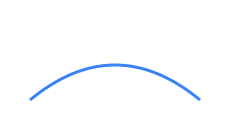
Generated SVG
xml
<svg xmlns="http://www.w3.org/2000/svg" data-boundsvg-node-id="auto:0" viewBox="0 0 240 140" width="240" height="140">
  <rect x="0" y="0" width="240" height="140" fill="#ffffff"/>
  <g data-boundsvg-node-id="auto:0.0">
    <g data-boundsvg-node-id="auto:0.0.0">
      <svg data-boundsvg-node-id="auto:0.0.0" x="20" y="20" width="200" height="100" overflow="visible">
        <path d="M10 80 Q 95 10 180 80" fill="none" stroke="#3b82f6" stroke-width="3"/>
      </svg>
    </g>
  </g>
</svg>