Appearance
Flex
Flexbox layout container.
Props
Container
| Prop | Type | Default | Description |
|---|---|---|---|
direction | "row" | "column" | "column" | Main axis direction |
wrap | "nowrap" | "wrap" | "nowrap" | Line wrapping |
alignItems | "start" | "center" | "end" | "stretch" | "stretch" | Cross-axis alignment |
justifyContent | "start" | "center" | "end" | "space-between" | "space-around" | "start" | Main-axis alignment |
gap | number | — | Gap between items in px (sets both row-gap and column-gap) |
rowGap | number | — | Row gap in px (overrides gap) |
columnGap | number | — | Column gap in px (overrides gap) |
With overflow="clip", child paint is clipped to the Flex layout box using the same resolved borderRadius as its background. With overflow="visible", rounded backgrounds and borders do not clip children.
The clipping boundary also cuts the Flex's own border and shadow at its rounded corners.
That explicit clip also excludes pointer hits on the Flex and its descendants outside its rectangle or resolved rounded corners. With overflow="visible", the background radius does not clip child paint or hits.
Flex Item (when Flex is a child of another Flex)
| Prop | Type | Default | Description |
|---|---|---|---|
flexGrow | number | 0 | Flex grow factor |
flexShrink | number | 1 | Flex shrink factor |
flexBasis | number | "auto" | "auto" | Flex basis in px or "auto" |
alignSelf | "auto" | "start" | "center" | "end" | "stretch" | "auto" | Self alignment override |
Grid Item (when Flex is a child of Grid)
| Prop | Type | Description |
|---|---|---|
gridColumn | string | Grid column placement (e.g. "1 / 3") |
gridRow | string | Grid row placement (e.g. "1 / 2") |
Also accepts common box props (width, height, minWidth, maxWidth, minHeight, maxHeight, aspectRatio, padding, margin, background, boxShadow, border*, stroke*, strokeScaling, overflow, opacity, zIndex, meta, transform, animate, position, top, right, bottom, left). strokeScaling?: "transform" | "canvas" controls whether a solid border scales with post-layout transforms or keeps its canvas-space width; the default is "transform". animate?: AnimationSpec attaches a declarative opacity/transform track; see Animation.
Event / Identity
| Prop | Type | Description |
|---|---|---|
onClick | string | Click handler reference |
onDoubleClick | string | Double-click handler reference |
onContextMenu | string | Context menu handler reference |
onPointerMove | string | Pointer move handler reference |
onPointerEnter | string | Pointer enter handler reference |
onPointerLeave | string | Pointer leave handler reference |
id | string | Stable NodeId for hit-testing |
layer | string | Layer id for Layered Export |
All 21 event handler props are supported. See Event Handlers for the full list.
Example
Row Layout
tsx
<Canvas width={400} height={120} background="#0f172a">
  <Flex
    direction="row"
    gap={16}
    alignItems="center"
    width={400}
    height={120}
    padding={16}
  >
    <Box width={80} height={80} background="#3b82f6" borderRadius={8} />
    <Box width={80} height={80} background="#8b5cf6" borderRadius={8} />
    <Box width={80} height={80} background="#ec4899" borderRadius={8} />
  </Flex>
</Canvas>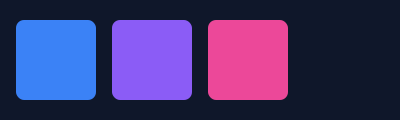
Generated SVG
xml
<svg xmlns="http://www.w3.org/2000/svg" data-boundsvg-node-id="auto:0" viewBox="0 0 400 120" width="400" height="120">
  <rect x="0" y="0" width="400" height="120" fill="#0f172a"/>
  <g data-boundsvg-node-id="auto:0.0">
    <g data-boundsvg-node-id="auto:0.0.0">
      <rect x="16" y="20" width="80" height="80" rx="8" ry="8" fill="#3b82f6"/>
    </g>
    <g data-boundsvg-node-id="auto:0.0.1">
      <rect x="112" y="20" width="80" height="80" rx="8" ry="8" fill="#8b5cf6"/>
    </g>
    <g data-boundsvg-node-id="auto:0.0.2">
      <rect x="208" y="20" width="80" height="80" rx="8" ry="8" fill="#ec4899"/>
    </g>
  </g>
</svg>
Space Between
tsx
<Canvas width={400} height={100} background="#0f172a">
  <Flex
    direction="row"
    justifyContent="space-between"
    alignItems="center"
    width={400}
    height={100}
    padding={16}
  >
    <Box width={60} height={60} background="#3b82f6" borderRadius={8} />
    <Box width={60} height={60} background="#8b5cf6" borderRadius={8} />
    <Box width={60} height={60} background="#ec4899" borderRadius={8} />
  </Flex>
</Canvas>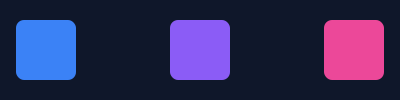
Generated SVG
xml
<svg xmlns="http://www.w3.org/2000/svg" data-boundsvg-node-id="auto:0" viewBox="0 0 400 100" width="400" height="100">
  <rect x="0" y="0" width="400" height="100" fill="#0f172a"/>
  <g data-boundsvg-node-id="auto:0.0">
    <g data-boundsvg-node-id="auto:0.0.0">
      <rect x="16" y="20" width="60" height="60" rx="8" ry="8" fill="#3b82f6"/>
    </g>
    <g data-boundsvg-node-id="auto:0.0.1">
      <rect x="170" y="20" width="60" height="60" rx="8" ry="8" fill="#8b5cf6"/>
    </g>
    <g data-boundsvg-node-id="auto:0.0.2">
      <rect x="324" y="20" width="60" height="60" rx="8" ry="8" fill="#ec4899"/>
    </g>
  </g>
</svg>